Unlock Version
Lock Version
Changelog for QGIS 3.8

Release date: 21 June, 2019
QGIS 3.8 brings an extensive list of new changes and a lot of polishing of existing features - the highlights of which we will try to cover here. As always can we remind you that QGIS is an open source project and if you are able to, consider supporting our work through donations, sponsorship or contributions to the code documentation, web site and so on.
Thanks
We would like to thank the developers, documenters, testers and all the many folks out there who volunteer their time and effort (or fund people to do so). From the QGIS community we hope you enjoy this release! If you wish to donate time, money or otherwise get involved in making QGIS more awesome, please wander along to qgis.org and lend a hand!
QGIS is supported by donors and sponsors. A current list of donors who have made financial contributions large and small to the project can be seen on our donors list. If you would like to become an official project sponsor, please visit our sponsorship page for details. Sponsoring QGIS helps us to fund our six monthly developer meetings, maintain project infrastructure and fund bug fixing efforts. A complete list of current sponsors is provided below - our very great thank you to all of our sponsors!
QGIS is Free software and you are under no obligation to pay anything to use it - in fact we want to encourage people far and wide to use it regardless of what your financial or social status is - we believe empowering people with spatial decision making tools will result in a better society for all of humanity.
Print Layouts
To make it easy to create your perfect QGIS Print Layout, we added new tools for automatically re-positioning items so that horizontal or vertical space between them is equal. This addition nicely rounds out the existing options for aligning items, bringing more of the power of a dedicated DTP application directly inside the QGIS Print Layout Designer!
This feature was developed by Matteo Nastasi
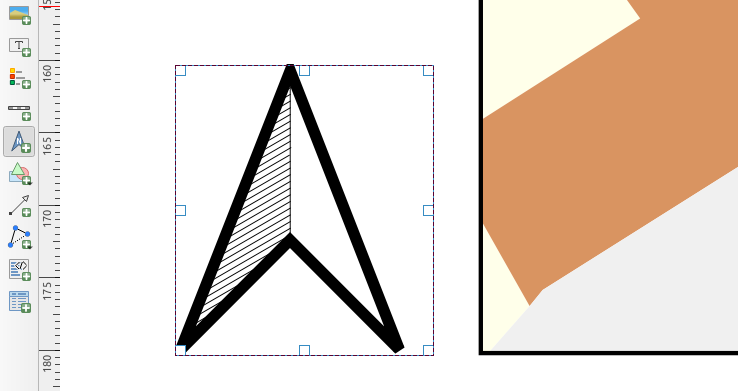
We've listened to user feedback which indicated that the previous approach for creating north arrows within print layouts was too difficult, and consequently have added a new button in the Print Layout Designer for direct north arrow creation. This button is a shortcut to adding a picture item, setting it to a north arrow picture, and linking it with a map. The end result is identical, but it's much easier for new users to understand if we expose it as an explicit "North Arrow" item!
Even experienced users will likely appreciate the improved workflow, including automatically linking the picture rotation to a sensible default map choice (if a map is selected, it's used. If not, the topmost map item under the newly drawn north arrow is used. If there's none, the layout's 'reference map' (or biggest map) is used as a fallback).
Import PR from Github into Entries